In progress · Multi-tenant ecommerce SaaS platform
AcceptCart
One platform. Multiple stores. Connected operations.
A multi-tenant commerce platform that connects store management, customer shopping, delivery operations, and centralized platform administration.
- My role
- Frontend lead, with project coordination. I work on frontend engineering, UI architecture, feature implementation, and integration planning, and I coordinate with backend development and design. The backend and the platform as a whole are a team effort.
- Technology
- Next.jsReactTypeScriptTailwind CSS
/ The four interfaces
Four interfaces share one backend. Two belong to each tenant, one belongs to the drivers, and one belongs to the platform team.
Visit the site — acceptcart.com- 01Tenant admin dashboardGive each business the tools to manage its store and daily operations.
- 02Customer storefrontThe customer-facing shopping experience for each tenant.
- 03Delivery applicationSupport delivery operations and connect orders with delivery personnel.
- 04Super admin / platform managementManage the SaaS platform and its tenant ecosystem.
/ Overview
Businesses need more than an online storefront. They also need tools to manage products, customers, orders, delivery, and integrations with the systems they already run.
AcceptCart brings these workflows into a connected platform. Each tenant gets its own administration and storefront experience, and the platform team manages the SaaS environment from a separate, platform-level interface.
/ Product goals
- 01Support multiple businesses on a shared SaaS platform.
- 02Give each tenant its own administration and storefront experience.
- 03Connect order management with delivery operations.
- 04Enable configurable integrations with external ERP systems.
- 05Provide platform-level controls for managing the SaaS environment.
/ The four interfaces
Four interfaces, one product
- Verified
- In progress
- Planned or documented, not yet verified
01
Tenant admin dashboard
Give each business the tools to manage its store and daily operations.
A business-specific workspace. Everything a tenant sees is scoped to its own store: catalog, orders, customers, storefront settings, delivery, and integrations.
- Store administration and settings.In progress
- Product and catalog management.In progress
- Order management.In progress
- Customer and business data management.In progress
- Storefront configuration.In progress
- Delivery configuration and driver management.Planned or documented, not yet verified
- ERPNext integration settings: URL, API credentials, and a connection test.In progress
- Delivery assignment and operational tracking.Planned or documented, not yet verified
- Analytics and business reporting.Planned or documented, not yet verified
02
Customer storefront
The customer-facing shopping experience for each tenant.
One storefront codebase, configured per tenant. The screenshot below is a tenant store (Foonat) with catalog browsing, search, deals, and account, wishlist, and cart entry points. The public site lists Default, Modern, Classic, and Minimal themes. A Marketplace variant appears in the architecture notes and is not confirmed as available.
- Product browsing and product details.In progress
- Shopping cart and checkout.In progress
- Customer authentication and registration.In progress
- Responsive shopping experience.In progress
- Tenant-specific store configuration.In progress
- Storefront themes: Default, Modern, Classic, Minimal (as listed on the public site).Planned or documented, not yet verified
- Checkout payments through Hesabe.Planned or documented, not yet verified

03
Delivery application
Support delivery operations and connect orders with delivery personnel.
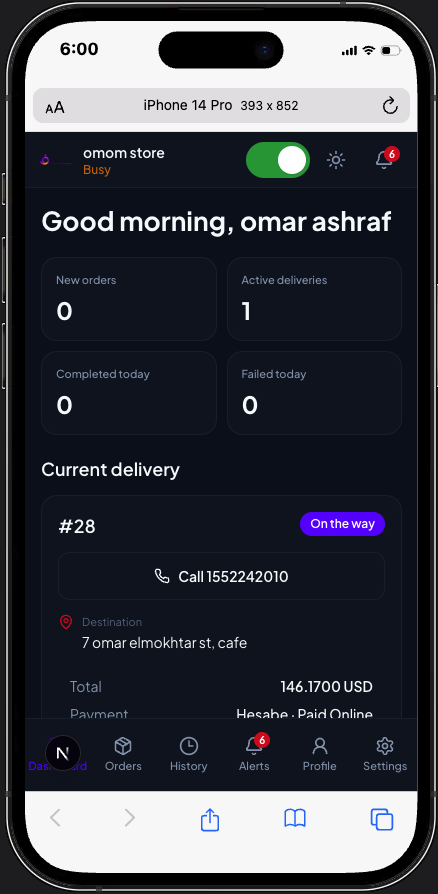
A driver-facing mobile app. The dashboard below shows a named driver session, store status, order counts, and a current delivery with destination, call action, total, and payment state. Real-time GPS tracking, live navigation, push notifications, and route optimization are not claimed from this screen.
- Driver session on a dashboard with store status and alerts.In progress
- Profile and settings entry points.In progress
- Current delivery with status, such as On the way.In progress
- Destination address and a call action on the active order.In progress
- Order totals and payment state on the delivery card.In progress
- Map, live GPS, or route optimization.Planned or documented, not yet verified
04
Super admin / platform management
Manage the SaaS platform and its tenant ecosystem.
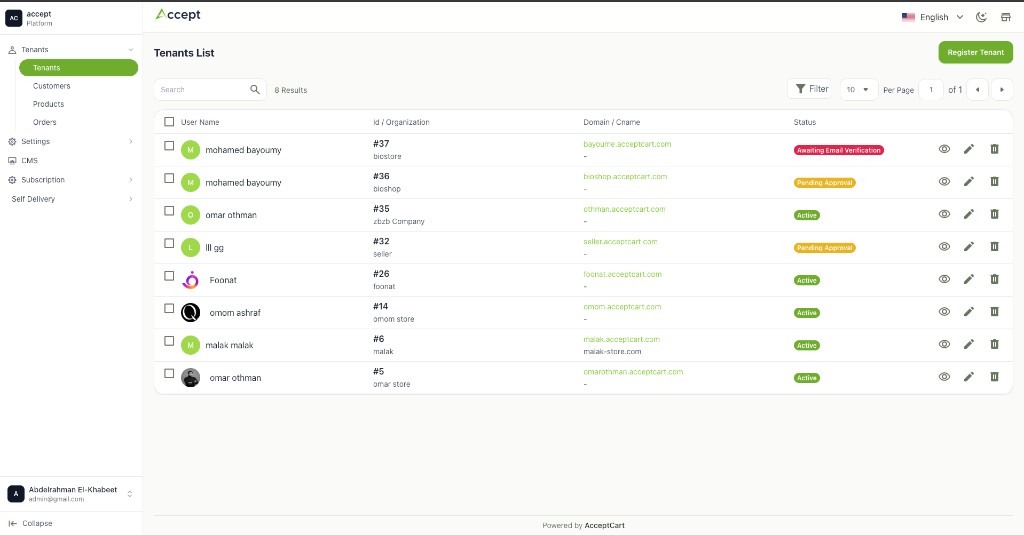
Platform-level administration is separate from tenant-level administration. The screenshot is the Tenants List: search, status, domain mapping, and register/view/edit actions. The sidebar also lists Customers, Products, Orders, Settings, CMS, Subscription, and Self Delivery. Those other screens are not shown here, so they are not treated as complete.
- Tenants list with search, status, domain or CNAME, and view, edit, or delete actions.Verified
- Register tenant, with statuses such as Pending Approval and Awaiting Email Verification.Verified
- Sidebar for customers, products, orders, settings, and CMS.In progress
- Subscription section in the platform nav.In progress
- Self Delivery section in the platform nav.In progress
/ Architecture
Shared platform, tenant-scoped data
Multiple businesses operate on a shared platform while their business data and management workflows are scoped to the appropriate tenant. Each tenant has an admin and a storefront. The delivery app and the platform admin sit beside them. All of them talk to a shared, tenant-aware backend, which owns the database and the boundary to external services such as ERPNext and the payment provider.
This is a conceptual diagram. The backend repositories were not available while writing this page, so tenant identification, authorization, and data isolation are described at the product level only, and the diagram does not claim a specific deployment layout.
Super admin / platform management
Tenant A
Tenant B
Delivery
Tenant-aware backend and business logic
Database, scoped per tenant
ERPNext (planned)
Payment provider (planned)
/ ERPNext integration
ERPNext integration
Many businesses already run an ERP. The integration lets a tenant connect its own ERPNext instance and keep the commerce catalog and orders in step with it. The flow below is the intended workflow. Each step is labelled with its current state.
- 01A tenant configures its ERPNext URL and API credentials.
- 02The system tests the connection.
- 03The integration layer handles the connection and synchronization workflow.
- 04Product and item mapping connects the commerce catalog with ERPNext records.
- 05Order synchronization connects commerce operations with the ERP.
Status by capability
- Tenant integration settings UI with credentials and connection test.In progress
- Integration layer and synchronization workflow.Planned or documented, not yet verified
- Item mappings between catalog products and ERPNext items.Planned or documented, not yet verified
- Customer mappings.Planned or documented, not yet verified
- Order mappings and order synchronization.Planned or documented, not yet verified
/ More business features
- Self-delivery configuration in the platform admin nav.In progress
- Driver management and assignment.Planned or documented, not yet verified
- Customer authentication with email verification.In progress
- Password reset and OTP verification flows.In progress
- Abandoned-cart segmentation and messaging.Planned or documented, not yet verified
- Profit-margin monitoring.Planned or documented, not yet verified
- Dead-stock detection.Planned or documented, not yet verified
- Smart discount controls.Planned or documented, not yet verified
- Smart product bundle suggestions.Planned or documented, not yet verified
/ My contributions
- Building and maintaining frontend interfaces with Next.js, React, TypeScript, and Tailwind CSS.
- Structuring reusable components and frontend modules used across more than one interface.
- Implementing responsive dashboards and user workflows.
- Translating product requirements into clear user interfaces.
- Connecting frontend features to backend APIs.
- Handling loading, error, validation, and authentication states where implemented.
- Coordinating with backend developers and designers.
- Breaking requirements down into manageable development tasks.
- Keeping maintainability, usability, and consistency in view across the platform's interfaces.
/ Challenges and decisions
01
- Problem
- Four interfaces, built by a team, drift apart in look and behaviour.
- Approach
- Shared components and layout patterns for tables, forms, status, and empty states, and one set of rules for how a screen is composed.
- Trade-off
- New screens take a little longer the first time. Changes later land in one place.
02
- Problem
- The same storefront has to behave differently per tenant.
- Approach
- Tenant configuration drives the storefront. Theme, store settings, and content come from the tenant, and the code stays the same.
- Trade-off
- More configuration surface in the admin, and fewer forks of the storefront code.
03
- Problem
- Integrations like ERPNext are designed before they are fully built.
- Approach
- Design the tenant-facing settings and the connection test first, keep mapping and sync as later steps, and keep anything unfinished out of the storefront.
- Trade-off
- The UI can ship ahead of the sync pipeline, and nothing on screen promises more than exists.
04
- Problem
- Frontend and backend move at different speeds.
- Approach
- Requirements are split into frontend and backend tasks with a clear contract between them, so each side can build without waiting.
- Trade-off
- More coordination up front. Fewer blocked tasks later.
/ Technology
Frontend
- Next.js
- React
- TypeScript
- Tailwind CSS
Platform
- Laravel / PHP
- MySQL
- Bagisto
From project documentation. The backend repositories were not available for verification.
Integrations
- ERPNext (planned)
- Hesabe payments (planned)
/ Screens
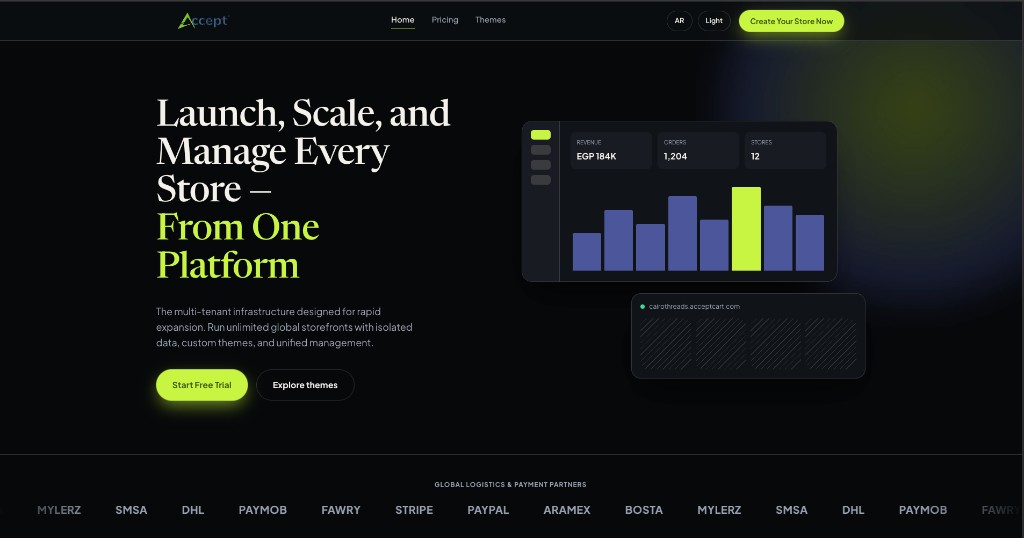
Public site
acceptcart.com, the live marketing site.
- Screenshot not added yet
Tenant admin dashboard
Store workspace for one tenant.
Storefront home
A tenant storefront (Foonat): catalog, deals, and cart.
- Screenshot not added yet
Product and checkout
Product detail and the checkout flow.
Delivery application
Driver dashboard: current delivery, destination, and payment state.
Platform admin
Tenants list: status, domains, and register tenant.
- Screenshot not added yet
ERP integration settings
ERPNext URL, credentials, and connection test.
/ What this project shows
Four interfaces, one consistent frontend
- Designing frontend experiences for a multi-interface SaaS product.
- Working across customer-facing and business-facing workflows.
- Building maintainable React and Next.js interfaces.
- Understanding API integration and system boundaries.
- Collaborating across frontend, backend, and product requirements.
/ How this page was verified
Verified: the public site at acceptcart.com is live, and it lists the Default, Modern, Classic, and Minimal themes. Everything marked in progress or planned comes from project documentation and my own work on the product. The backend and application repositories were not available while writing this page, so no capability is marked verified on their basis. No customer counts, revenue, or performance figures are quoted.
Carrier lists, payment coverage, and platform statistics on acceptcart.com are marketing copy. They are not a record of shipped features.